


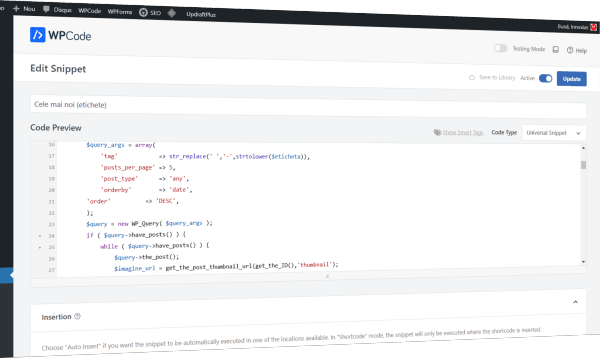
Why do I need code snippets?
When creating or modifying a WordPress site, we often need to make small tweaks to functionality or appearance. Or even add new features that we can’t find implemented in the WordPress core or in the theme we’re using.
And then, the first impulse is to look for a plugin in the WordPress.org repository. And if we’re lucky, we find one. And if we’re insanely lucky, it’s been tested with the latest version of WordPress because, of course, we’re smart folks and we keep our WordPress up to date. The problems that can appear in this case might be:
- nobody builds a plugin for a single minor issue. Usually, a plugin solves several things, things we don’t need. So we’re loading the system with dead weight;
- we’re at the mercy of the developer who created the plugin. If a bug or a security hole appears, if the software needs to be updated for the new WordPress version (which we’ve just installed), or if they simply keep working on it or got bored and are now growing organic onions instead;
- we want a small change. Really small. Again, we’re waiting on them, maybe we’re lucky and they’ve thought of it too. Sure, I could get in touch and ask for it. I should be prepared to pay them as well. Or, if I know what I’m doing, I can modify the plugin myself and at the next update I start all over again, because the code logic might have changed;
For example, I won’t find any plugin that does this and formats everything consistently with the theme I’ve chosen. And the theme itself doesn’t offer this module either. I needed a module that would display the 5 most commented articles (see romanian Gadgetisimo).

Well, if I know a bit of PHP, CSS or JavaScript (or I’m willing to learn), I could write the code I need myself. And with the help of a plugin (yes, I do need a plugin for this), I can insert that code wherever I want. Maybe I want it in a specific post, maybe in all posts, or maybe in a specific area of the site.
Introducing the WPCode WordPress plugin
There are many such plugins. I chose WPCode from… WPCode, of course 😃
What can we do with the free version of WPCode?
- We can use code snippets of the following types:
- HTML
- Text
- CSS
- JavaScript
- PHP
- Universal (here I can combine any of the above)
- Snippets can have parameters. For example, for the block in the image, a parameter could be the number of posts to display.
- Snippets can be inserted in two ways:
- Auto Insert: they will be inserted in various places (for example before the post) or as
- Shortcode, in which case we can insert them with greater precision, for example above a specific paragraph in a specific post
- We can decide to load them depending on the type of device used by the site visitor:
- any device
- desktop only
- mobile only
- We can build logical rules that control loading, for example:
- load only if the user is not an administrator and the post has the LibreOffice tag
- We can insert code snippets in the Header, Body and Footer. We can use this feature, for example, to insert the code required for Google AdSense
OK, I’m a beginner and I might mess up the code. Will my site crash? Will the server catch fire? Will the Internet Police come after me? No. Not quite. The plugin can detect syntax errors. If the code snippet is active at the time of saving and the plugin detects a syntax error, it saves the snippet but switches it to inactive status. Of course, we’ll get a message that this happened and what the error is.
But that’s not all we can do with the WPCode plugin.
Ready‑to‑use code snippets
And to make things even easier, the free version gives us 140 ready‑to‑use code snippets, grouped by category. Here are a few examples:
- Duplicate post
- Allow SVG file uploads
- Add a file size column in the Media Library
- Add an image zoom (magnifying glass)
- Replace the WordPress logo with your own logo on the login page
And if we use the AIOSEO or WPForms plugins (built by the same team), we get another 121 and 141 ready‑to‑use code snippets, respectively. For example, Add border to form, as we used on the Give us ideas page.
These snippets aren’t just useful in themselves. They’re also a very good way to learn web programming.
I’ll let you discover everything you can do with it.
Happy Coding!
