
- Enabling an adblocker delays lag in 7/9 browsers, letting you open notably more tabs before slowdown (Edge +20–22, Firefox +16, Chrome +8–11).
- With adblocking, many browsers no longer hit the 97% RAM “red zone” within 100 tabs (Edge, Chrome) and Firefox pushes it to ~96 tabs.
- Swap usage drops dramatically with adblockers (e.g., Firefox −2.5 GB), cutting stutter; some RAM use rises, which is preferable to swapping.
In the recent tests on browser memory usage in Windows, we looked at “standard” behavior, with no active extensions. In real-world use, though, most people browse with an adblocker enabled. I reran the entire test suite, with the same methodology and the same hardware, to see how much RAM you actually save, when lag kicks in, and how browser stability changes once ads and tracking code are stripped out. The results radically reshuffle the rankings.
In day-to-day browsing, very few people go online today without an adblocker running. Whether it’s about blocking intrusive ads, limiting tracking, or simply getting a cleaner experience, adblocking has become an integral part of many users’ daily workflow.
That naturally raises a question: if we strip out ads and a large chunk of tracking code, does that also change how the browser uses hardware resources?
More specifically: does an adblocker help the browser use RAM more efficiently, or does it actually add extra overhead?
To answer properly, I reran the entire test suite, using exactly the same methodology, the same lab setup, and the same analysis thresholds — but this time with an adblocker enabled in every browser. The results are clear and different enough to deserve their own article.
Why I also tested browsers with adblockers enabled
Using an adblocker in your browser is usually associated with blocking annoying ads and tracking scripts — in short, giving users cleaner browsing sessions. But it’s also interesting to see whether an adblocker helps shrink the browser’s footprint on hardware resources.
Less code executed in the browser, fewer external requests, less injected JavaScript, and fewer tracking connections should, in theory, translate into lower resource usage. The data from this test paints a pretty interesting picture.
Testing methodology (identical to the main test)
I used exactly the same methodology as in the main RAM usage test, with the only difference being that this time the adblocker was enabled.
For browsers with a built-in adblocking feature, I turned that on. For browsers without native blocking, I installed uBlock Origin, chosen because it’s one of the most popular adblock extensions. The exception was Yandex, where only AdGuard was available.
Everything else stayed the same:
- same hardware
- same operating system
- same thresholds (90% and 97% RAM)
- same tab-opening sequence
- same measurement scripts
If you want the full methodology in detail, I recommend reading the main article dedicated to RAM usage.
Adblockers delay the onset of lag in most browsers
In a heavy multitasking scenario with lots of tabs open, the first thing users feel is the moment when RAM fills up and lag becomes likely. That’s when the operating system starts leaning on disk space, which is far slower than RAM.
In the test, this moment is captured by the Lag_Start_Tab indicator.
With an adblocker enabled, in 7 out of the 9 browsers tested, lag appears significantly later:
- Edge: +20–22 tabs
- Firefox: +16 tabs
- Opera, Comet, Yandex, Vivaldi: between +9 and +18 tabs
- Chrome: +8–11 tabs
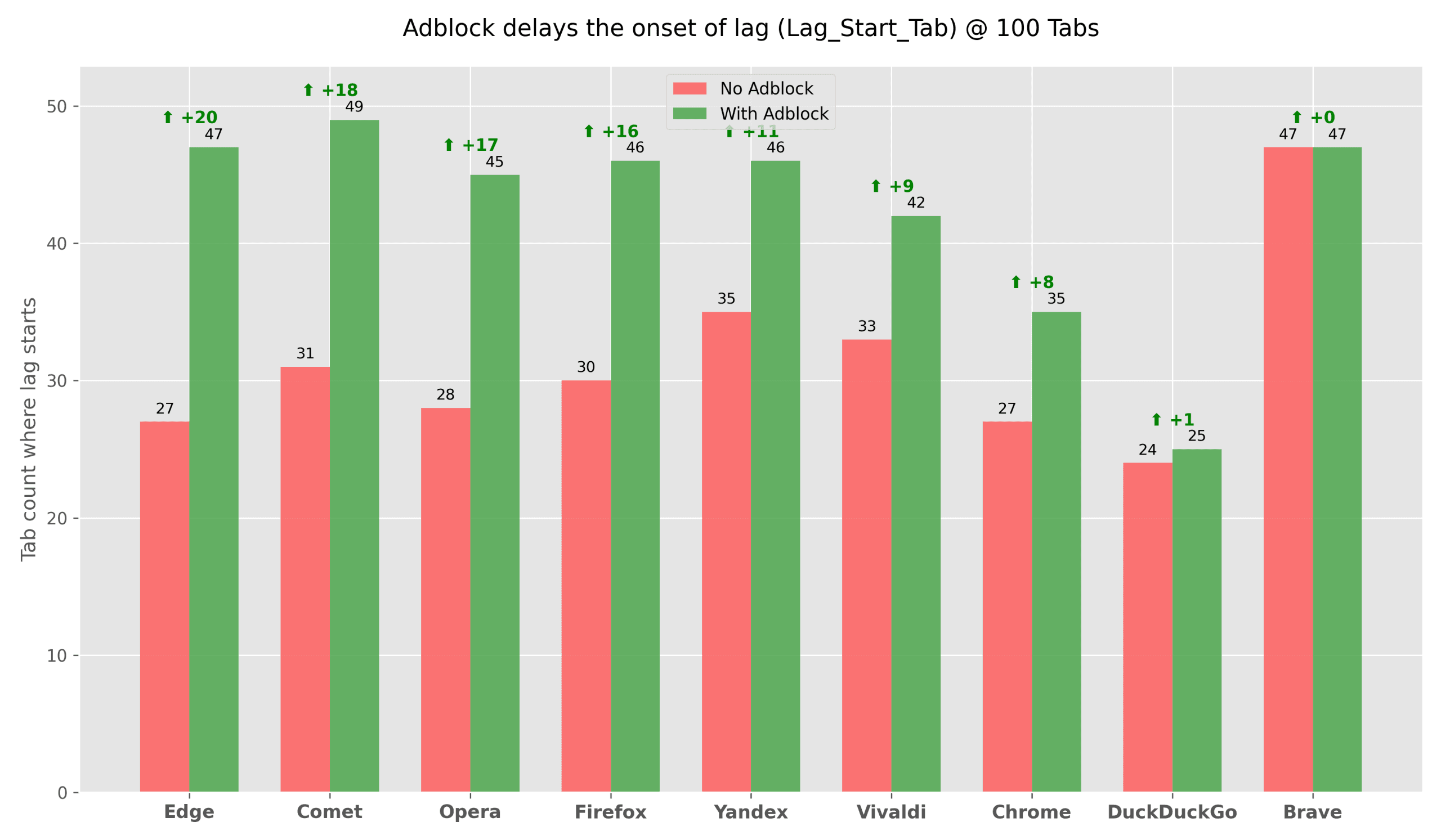
There are notable exceptions: Brave and DuckDuckGo remain almost neutral, with the adblocker having no visible impact on when lag appears.
The takeaway is clear: in most cases, an adblocker doesn’t just avoid degrading the experience — it visibly improves it, allowing the browser to stay smooth for longer under load. For Brave and DuckDuckGo, browsers built around privacy and anti-tracking from the ground up, it’s no surprise the improvement is smaller: there’s simply less “junk” left to block.
RAM stays freer with an adblocker enabled
A key element in the Gadgetisimo Memory Score methodology is the threshold where 97% of available physical RAM is in use — the zone where the risk of freezes and performance degradation rises sharply.
In this context, using an adblocker in the browser clearly increased the number of parallel tabs that could be opened before hitting that critical threshold, in the sequential test up to 100 tabs.
A few relevant examples:
- Edge: without adblock it hits the limit at 46 tabs → with adblock it no longer reaches the limit within 100 tabs
- Chrome: without adblock it hits the limit at 86 tabs → with adblock it doesn’t reach the limit up to 100
- Firefox: without adblock 61 tabs → with adblock 96 tabs
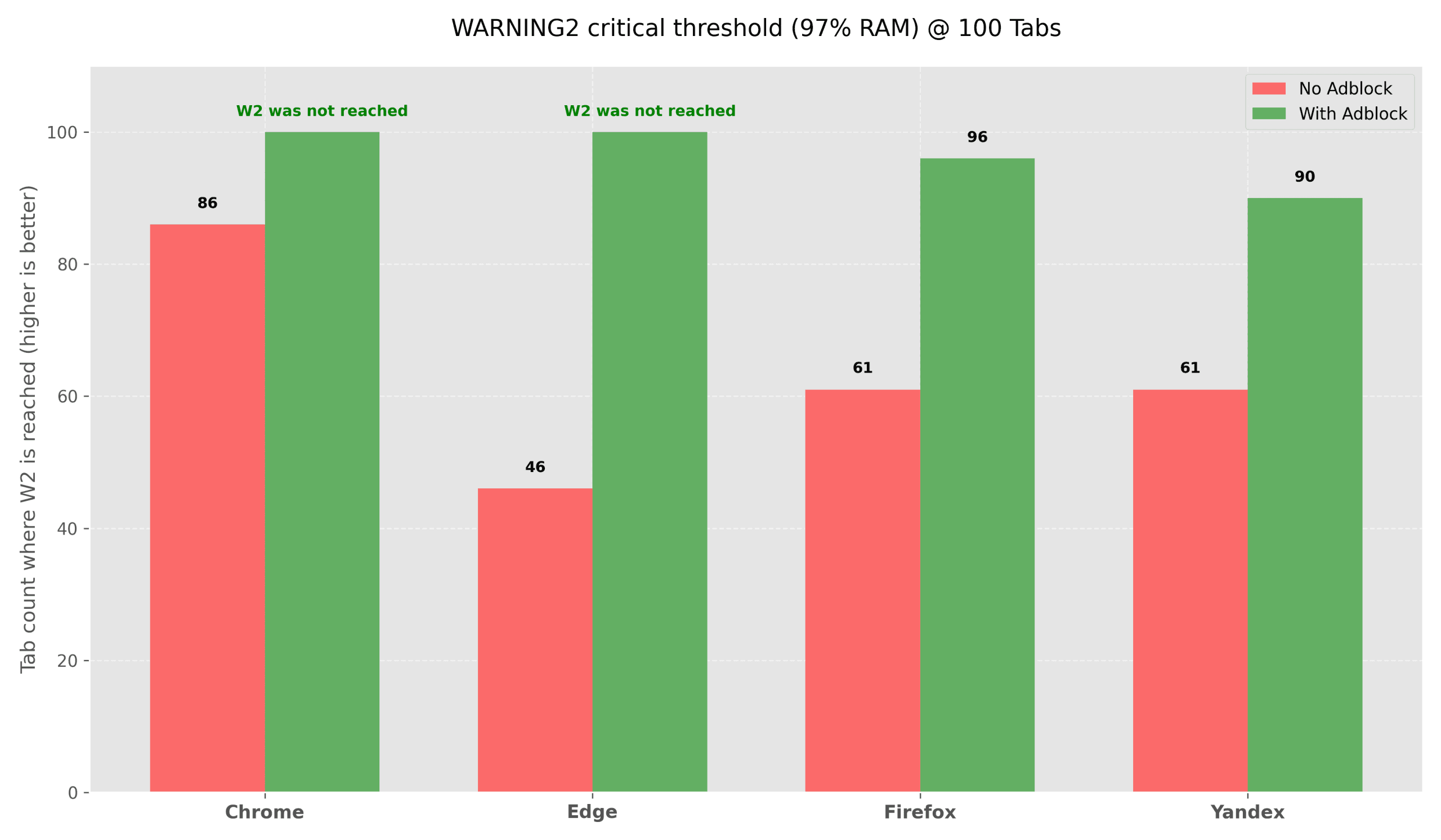
In practice, the adblocker either eliminates or significantly shifts the critical zone for several major browsers, clearly helping with multitasking in real-world usage scenarios.
Swap vs RAM – a “healthier” system with adblock enabled
At 100 tabs, one of the clearest differences shows up in swap/pagefile usage, one of the best indicators of how the system is actually behaving.
With an adblocker enabled, swap values drop dramatically:
- Edge: −5947 MB swap
- Firefox: −2544 MB swap
- Vivaldi: −2035 MB swap
- Comet: −2184 MB swap
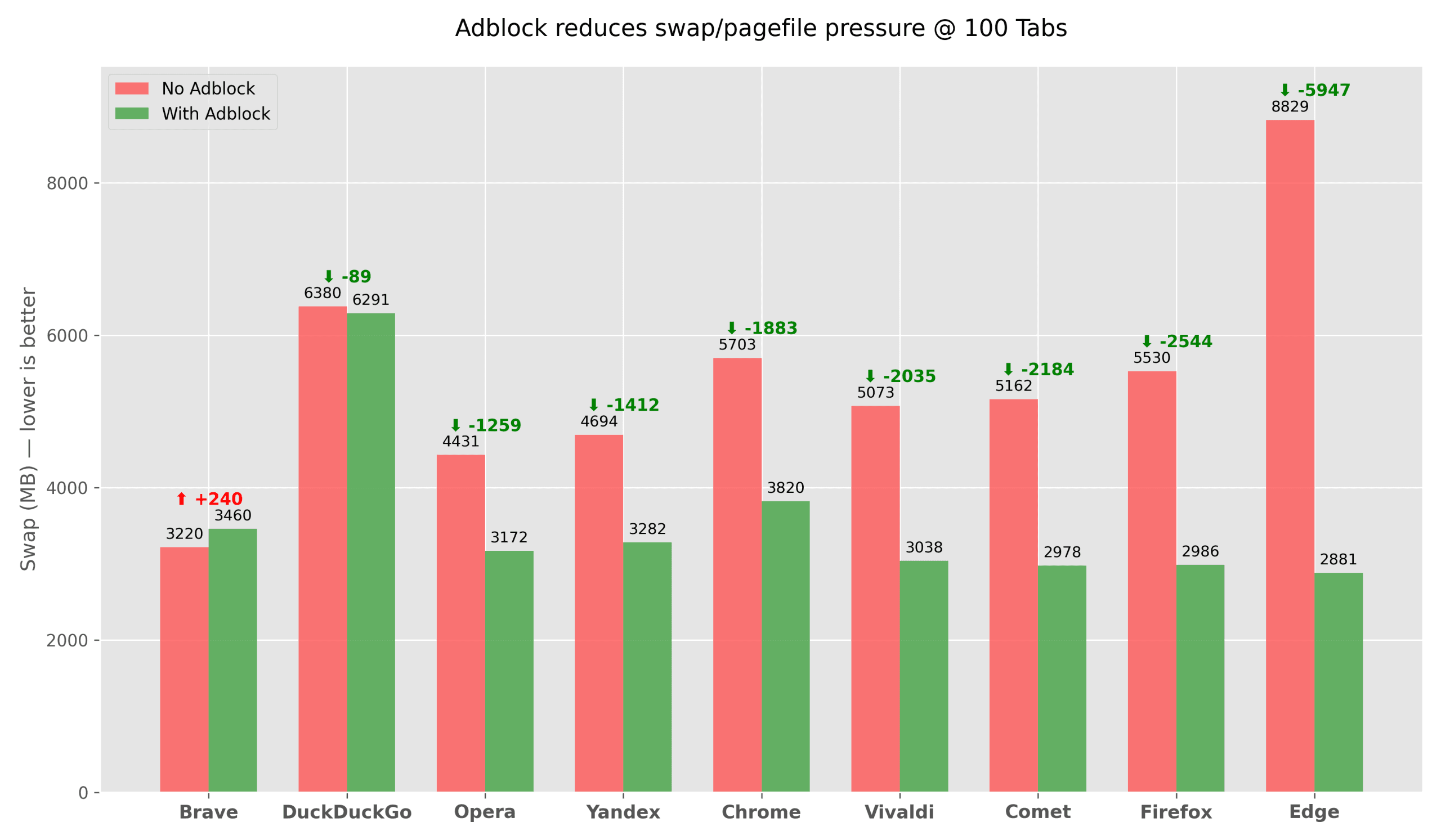
At the same time, many browsers show an increase in physical RAM (RSS) usage. That’s not a bad thing: using RAM is preferable to pushing data out to disk, which causes visible slowdowns across the entire system.
How the Gadgetisimo Memory Score rankings change
Applying the same Gadgetisimo Memory Score methodology to the data with adblockers enabled leads to a surprising outcome.
Top 3 RAM efficiency without adblock:
- Brave
- Chrome
- Firefox
Top 3 RAM efficiency with adblock:
- Firefox
- Edge
- Brave
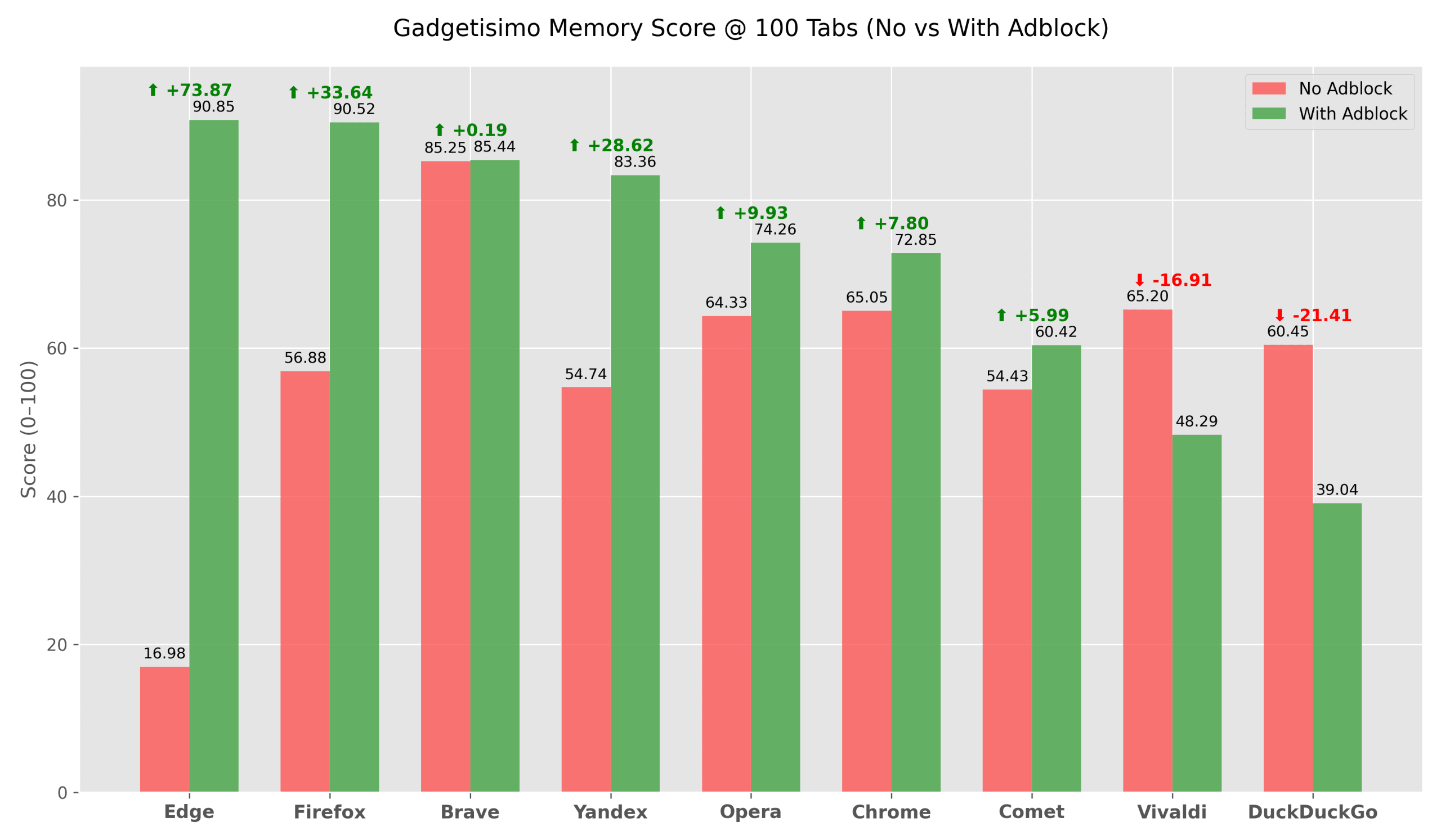
Firefox becomes the clear leader thanks to a mix of much-improved stability, lower swap usage, and very efficient use of physical RAM. Edge records the biggest relative jump in the entire test, leaping from last place straight to second, thanks to eliminating the critical threshold and massively cutting swap usage.
What these results tell us about real-world browser usage
This test makes it clear that an adblocker changes not only how we consume content on the web, but also how the browser interacts with the system’s hardware resources.
In most cases — especially with tracking-heavy browsers like Chrome or Edge — the difference between a stock browser and the same browser with an adblocker enabled is significant.
This isn’t an argument that “everyone must use an adblocker”, but it is solid evidence that, on the modern web, stripping out ads and tracking has a measurable impact not just on privacy, but also on real-world system performance.
Articles selected automatically based on the current article. Model: gpt-5